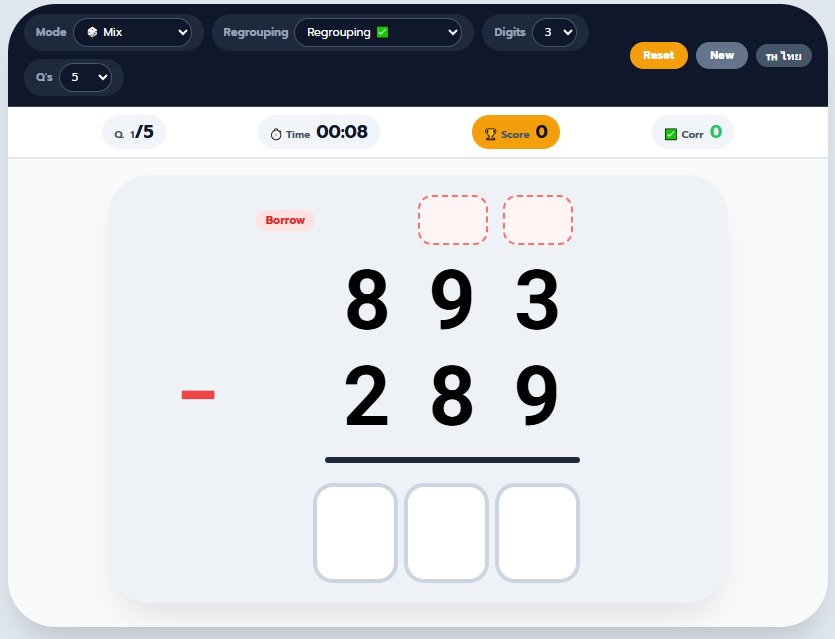
Practice column addition and subtraction the way it actually shows up on paper — except this version checks every answer instantly and only asks for a carry or borrow box when the problem actually needs one.
How the Game Works
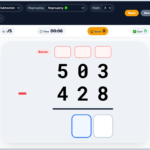
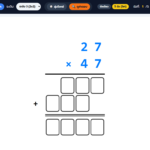
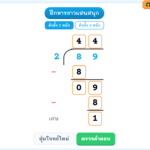
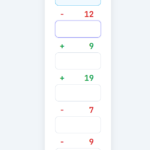
Each round gives a new vertical addition or subtraction problem. Type the answer one digit at a time; the cursor moves to the next box automatically, and each digit turns green or red the moment all boxes are filled, so students see exactly which digit they got wrong instead of just a final pass/fail.
Take a typical regrouping problem like 47 + 38. Most students add the ones column first (7 + 8 = 15), write down the 5, and carry the 1 into the tens column — and the carry is the step that gets forgotten most often. This game places a separate carry box directly above the tens column for that exact problem, so the carry step has to be written down rather than skipped in the student’s head. Subtraction works the same way in reverse: if a problem like 52 − 27 requires borrowing from the tens column, a borrow box appears above that column only, not above every column in the problem.
That last detail is the part most printable worksheets get wrong: they print a carry/borrow row above every problem whether it’s needed or not, which teaches students to fill boxes out of habit rather than understanding when regrouping actually applies. Here, the boxes only appear on the columns where carrying or borrowing genuinely happens, so an empty space is itself a signal that no regrouping was needed for that column.
Settings You Can Adjust
The game is built around four settings, so the same activity can serve a first grader just learning to carry and a fourth grader practicing five-digit subtraction:
- Operation — Addition only, Subtraction only, or Mix (random addition and subtraction problems in the same session)
- Regrouping — toggle carrying and borrowing on or off. Turning regrouping off is useful for students who need to build confidence with column addition before tackling the carry/borrow step
- Digits — choose 1 to 5 digits per number, so problems can scale from simple single-digit sums to multi-digit regrouping
- Questions per round — 5, 10, or 20 problems
A built-in timer and running score track both accuracy and speed, and a short results screen appears at the end of each round showing how many problems were answered correctly and how long the round took.
Why Regrouping Trips Students Up
Regrouping (carrying in addition, borrowing in subtraction) is usually the point where students who were confident with single-digit math start making mistakes — not because the arithmetic is harder, but because there’s an extra bookkeeping step that’s easy to forget under time pressure. Practicing with a digital format that forces the carry/borrow step to be written down, rather than done mentally and possibly skipped, is one of the more effective ways to make the habit stick before it’s tested on paper.
Works on Any Device
The layout adjusts for phones, tablets, and desktop screens, so it works equally well as a five-minute warm-up on a classroom Chromebook, independent practice at home, or a quick review on a tablet. An English/Thai toggle is also built in for bilingual classrooms.
Frequently Asked Questions
What is regrouping in addition and subtraction? Regrouping is the process of carrying a digit to the next column in addition (when a column adds up to 10 or more) or borrowing from the next column in subtraction (when the top digit is smaller than the bottom digit). It’s typically introduced once students are comfortable with basic column addition and subtraction.
Why does the carry or borrow box only show up sometimes? The game checks each problem digit by digit and only places a carry or borrow box above a column if that specific problem actually requires regrouping there. This keeps students from filling in boxes automatically without thinking about whether carrying or borrowing is needed.
What grade level is this for? The 1–2 digit, no-regrouping settings work well for early grade 1–2 students just learning column addition. The 3–5 digit settings with regrouping enabled are better suited to grades 3–4 practicing multi-digit carrying and borrowing.
Should regrouping be turned on or off first? Off first. Students generally benefit from being confident with plain column addition and subtraction before adding the extra step of carrying or borrowing, so starting with “Without Regrouping” and switching to “Regrouping” once a student is consistently accurate is a reasonable progression.
Does this replace printable worksheets? It works well alongside them rather than instead of them — the instant feedback is useful for independent practice or a warm-up, while printable worksheets are still useful for offline homework or assessment.







Leave a Reply